
Zunaid Khan
Forum Replies Created
-
AuthorPosts
-
 February 19, 2022 at 7:46 pm #12240
Hi Evelyn
Can you please let me know which lesson number you are referring to that requires CARBON-002
If possible, can you please attach a screenshot of the page in the manual.
I can’t seem to locate this on my side.
If it’s preventing you from continuing, please just create the item manually so long.
Kind regards
Zunaid
February 10, 2022 at 11:09 am #12214Hi Michelle
Please use all the details per the manual except for the email address.
For the email address please use your own.
You will then use your email to login each time.
Kind regards
Zunaid
February 8, 2022 at 12:56 pm #12210Hi Michelle
Are you creating an account on the training domain i.e.
https://training.accounting.sageone.co.za/Landing/Default.aspxAlso – are you using your own email address ?
If the answer is yes to both of the above, please let me know if you have previously created an account on the training domain.
If so, it may be best to use a different email address.
If you still experience any issues please setup a Teamviewer session here:
https://students.talentstream.co.za/teamviewer-session-setup/Kind regards
Zunaid
January 12, 2022 at 9:23 pm #12154Hi Heidi
With Sage One, you can post into any future date as long as you’re still posting in the current financial year.
As the example should take place in a single financial year it shouldn’t be an issue.
Kind regards
Zunaid
January 12, 2022 at 4:07 pm #12152Hi Heidi
I suggest using the current financial year but keep the day and month the same as per the examples.
So for example, if the exercise refers to 15 January 2019 you can process on 15 January 2022.
Hope that makes sense.
Kind regards
Zunaid
January 3, 2022 at 9:58 pm #12120Hi Jakobus
This is a design issue with the material that I will need to take up with Sage.
Essentially, the case study calls for exporting from the Demo company into the company you create.
The Demo company can however be edited by anyone which can cause issues. Sage resets all the data in the demo from time to time but it may not be clean when you are doing the exercise.
Your manual should also however have instructions on import data to use i.e. obtained from SageU.
I have added a new thread with data you can use here:
https://students.talentstream.co.za/forums/topic/importing-of-data/Kind regards
Zunaid
December 20, 2021 at 12:28 pm #12087Hi Shallun
Please see if the following video resolves the issue:
Kind regards
Zunaid
December 10, 2021 at 8:11 pm #12060Hi Jakobus
You should set this as at least 5 years as this is the period you need to keep records for accounting and tax purposes.
Hope that answers the question.
Kind regards
Zunaid
October 21, 2021 at 8:02 pm #11338Hi Leah
Yes you can setup different item accounts for Purchases (which is effectively cost of sales)
So what you should do is allocate your Supplier invoices to items (instead of allocating to a General Ledger account).
Each item can then be allocated to a specific Purchase Item Account in the General Ledger.
Hope that makes sense.
Kind regards
Zunaid
October 21, 2021 at 7:46 pm #11337Hi Leah
There is no specific branch functionality in Sage One.
So the only option would be to use Analysis Codes as you have pointed out.
Unfortunately this does require making sure that someone does enter the correct branch on every line item (on invoices, supplier invoices, etc) i.e. there is no way to set it globally per invoice.
This also only helps with the Income Statement side of things i.e. in terms of sales and costs you can pull separate Income Statements based on analysis codes.
If you are looking at splitting up Balance Sheet items e.g. debtors and creditors, that would be an issue.
Finally you should also think about user rights permissions e.g. if you have different people processing different branches you can’t control user rights based on Analysis codes.
Kind regards
Zunaid
October 21, 2021 at 7:25 pm #11336Hi Leah
If you are referring to the Income Statement items those are exclusive of VAT.
For example if you have sales of R10 000 excl. VAT then you wouldn’t show R11 500 (the amount inclusive of VAT) on your Income Statement as the business hasn’t earned R11 500. It has only earned R10 000 as the R1500 has to be paid over to SARS.
The only VAT you show in terms of budgeting will be on the Balance Sheet. If you forecast Debtors and Creditors these would be inclusive of VAT. And similarly you would forecast the Output / Input VAT account.
Hope that makes sense.
Kind regards
Zunaid
October 21, 2021 at 4:57 pm #11334Hi Elana
Please see video below.
Please also note that you should post any new query as a new question (this was posted as a reply on the welcome thread)
Kind regards
Zunaid
October 20, 2021 at 3:03 pm #11323Hi Leah
Can you please let me know the Lesson number, section and activity number and then the page number of that lesson..
Sage changes the manuals from time to time so I could be looking at something different from the page number only.
Thanks
Zunaid
October 20, 2021 at 1:03 pm #11308Hi Elana
There are no video lessons on the portal here fore the Sage Business Cloud course.
You follow the lessons in your manual.
The portal here is used for support i.e. if you get stuck or have any questions.
You will be working online while doing the course.
You have to create a company and user profile on the Sage One Business Cloud site here:
http://training.accounting.sageone.co.za
IMPORTANT: Please note that the link above is ONLY for training purposes. Please don’t create an actual company with live data on it.
Hope that makes sense.
Kind regards
Zunaid
October 14, 2021 at 5:15 pm #11287Hi Leah
As discussed its fine. Please continue as per the manual.
Kind regards
Zunaid
October 14, 2021 at 1:20 pm #11280Ok great Leah.
I just want to confirm that you were referring to an issue on the Training Sage One site i.e.
https://training.accounting.sageone.co.za/The reason is that for the Sage University website i.e. SageU, you should register there only when you are ready to write the final exam.
Kind regards
Zunaid
October 14, 2021 at 1:11 pm #11278Hi Leah
Can you please attach a screenshot of the message you’re getting.
Please also let me know the lesson number and page number you’re working on.
Thanks
Zunaid
April 28, 2021 at 11:29 pm #10607Hi Nicola
Apologies.
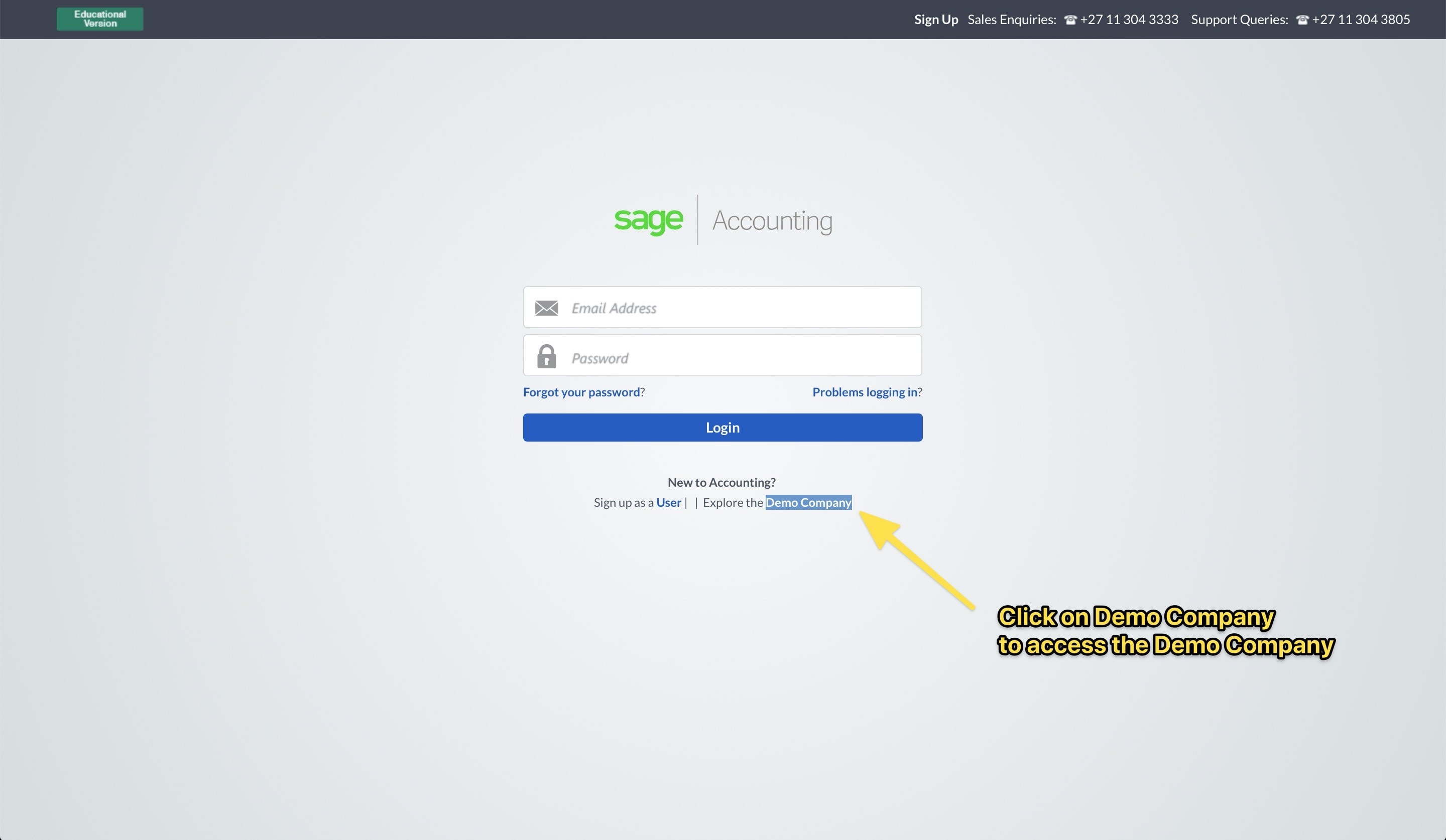
Go to:
http://training.accounting.sageone.co.zaPlease see screenshot below:
 April 28, 2021 at 9:34 am #10602
Hi Nicola
Can you please attach a screenshot showing no data ?
Also – please attach a backup file of that demo company so I can have a look.
Make sure you are watching the videos including the one that deals with showing the Explorer View. A blank screen doesn’t mean that there is no data.
Kind regards
Zunaid
April 11, 2021 at 8:04 am #10575Hi Bianca
Unfortunately, no I’m not sure what the issue could be.
Best to check that with Sage support as they can check on your live company.
Kind regards
Zunaid
March 29, 2021 at 1:33 pm #10551Hi Monique
Please see the updated video here:
https://students.talentstream.co.za/courses/sage-one-practitioner/lessons/how-to-take-the-sage-pastel-online-assessment-exam-sageone/Kind regards
Zunaid
March 16, 2021 at 10:32 pm #10510Hi Bianca
I don’t believe that’s possible unfortunately.
I would recommend marking the item code as inactive (and perhaps amending the description on it as well to include the words DO NOT USE)
Then create a new item code correctly and use that.
Kind regards
Zunaid
-
AuthorPosts