
Zunaid Khan
Forum Replies Created
-
AuthorPosts
-
 June 12, 2018 at 8:43 am #4394
When posting on the forum please see this thread that explains what details you need to include:
https://students.talentstream.co.za/forums/topic/welcome-please-read-this-first-2/
June 12, 2018 at 8:42 am #4393Hi Lynette
If you are creating a supplier it will be brand new and not have any activity or supplier invoices.
Can you please give me the exact lesson number (and activity number) in the training manual as well as page number in the training manual that you are working on.
Kind regards
Zunaid
June 12, 2018 at 8:15 am #4391Hi Lynette
Please let me know which lesson and page you are working on.
Please also attach a screenshot.
Kind regards
Zunaid
June 11, 2018 at 4:56 pm #4387Hi Lynette
For the course you need to sign up first (and for future sessions) login on the following address
https://training.accounting.sageone.co.za/Landing/Default.aspx
You will sign in with your email address.
If you forget your password please click on the link that says “Forgot your password?”
Please let me know if that solves the problem for you.
Kind regards
Zunaid
May 14, 2018 at 7:25 pm #4226Hi Stephen
OK, I understand
We run into the same limitations as we discussed on the recovery issue you had.
https://students.talentstream.co.za/forums/topic/sales-and-customer-set-up/#post-4188
May 14, 2018 at 6:53 pm #4224Hi Stephen
Yes, that looks right although the first entry should have the output VAT.
Kind regards
Zunaid
May 14, 2018 at 6:51 pm #4223Hi Stephen
I don’t believe this is possible as far as I know.
There aren’t separate fields for the run date and the invoice date.
However, I would suggest you confirm it with Sage on their online support.
Kind regards
Zunaid
May 9, 2018 at 8:13 am #4206Yes that is correct.
You would create an analysis code called Departments.
Kind regards
Zunaid
May 8, 2018 at 6:14 pm #4203Hi Stephen
You would use the Account Reporting Groups for this – see screenshots below
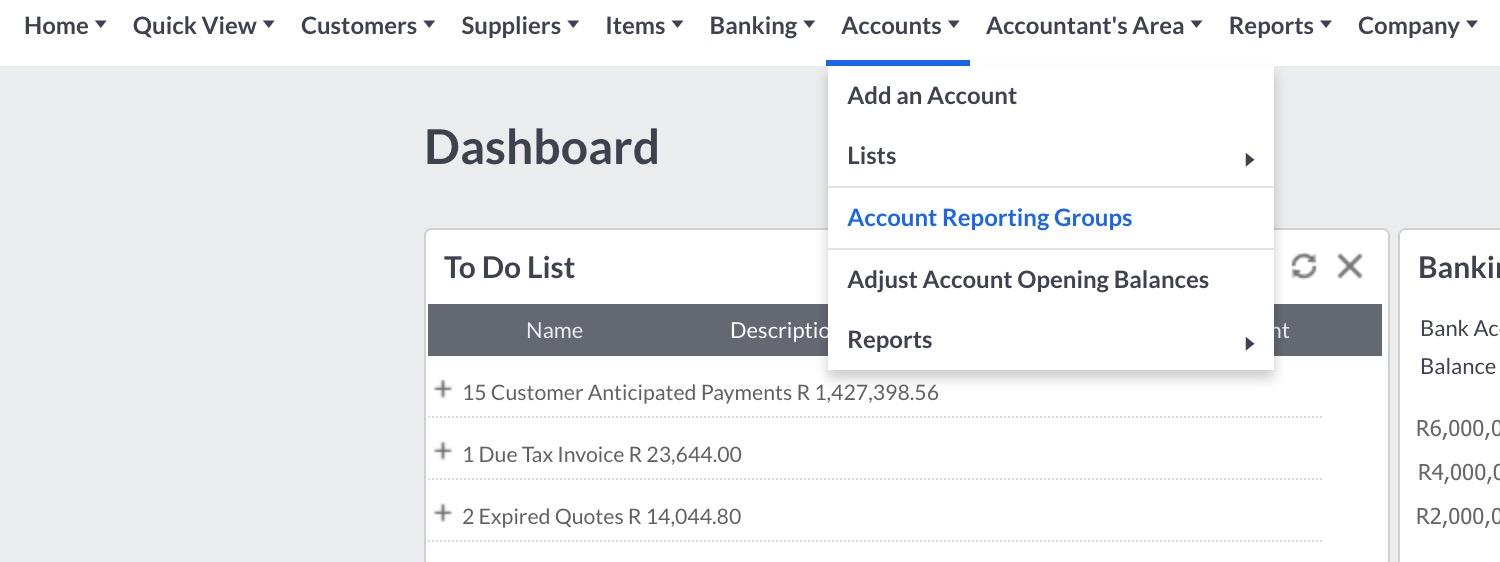
Then as per follows
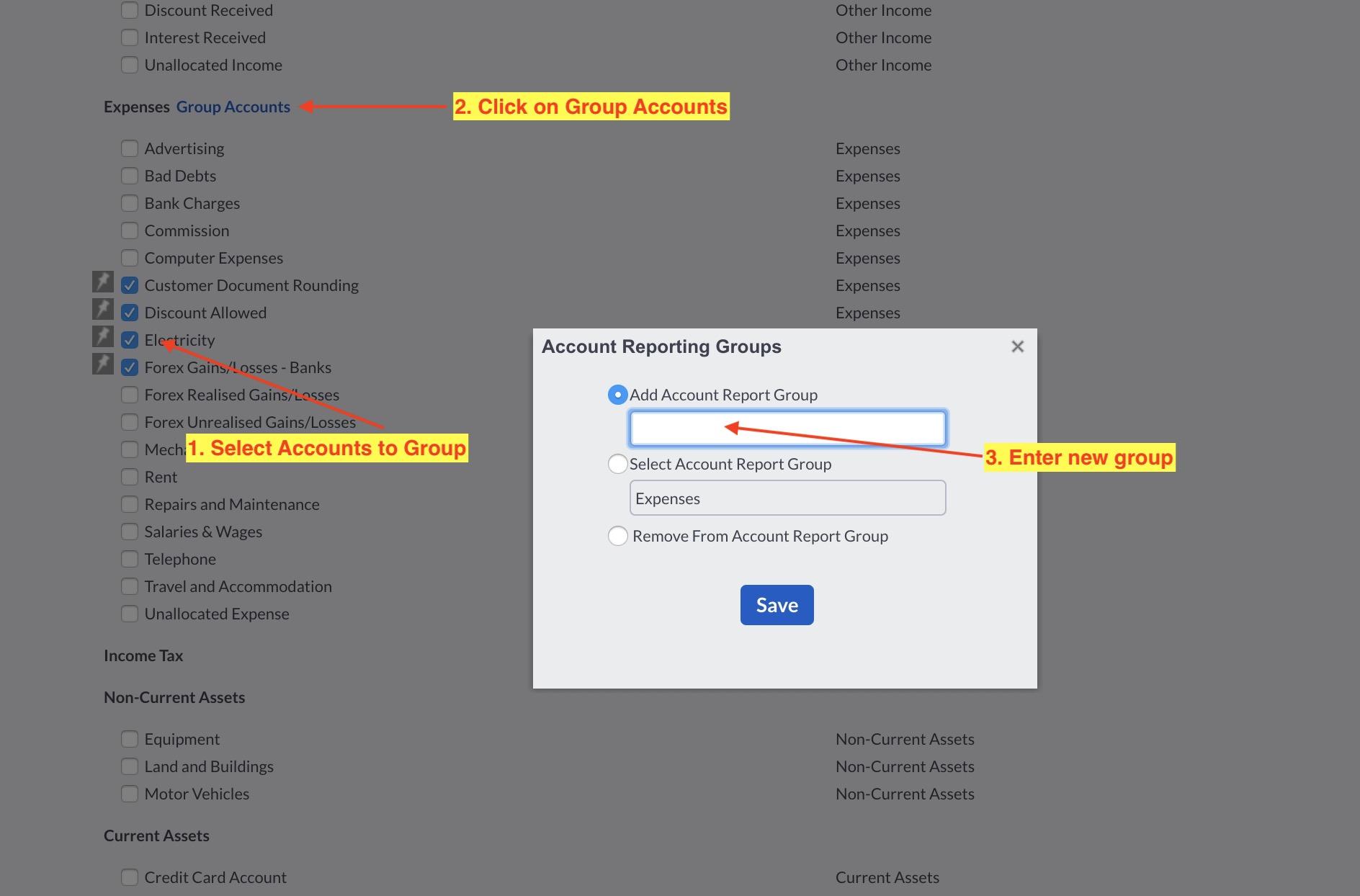 May 7, 2018 at 6:51 pm #4195
Hi Stephen
Just a quick note first.
Please post any new questions as separate threads / posts i.e. not as a reply to this post.
Each post should have a separate description.
This makes it easier for others later looking for the same answers to find them.
On to your questions.
You would change the description as per the video below.
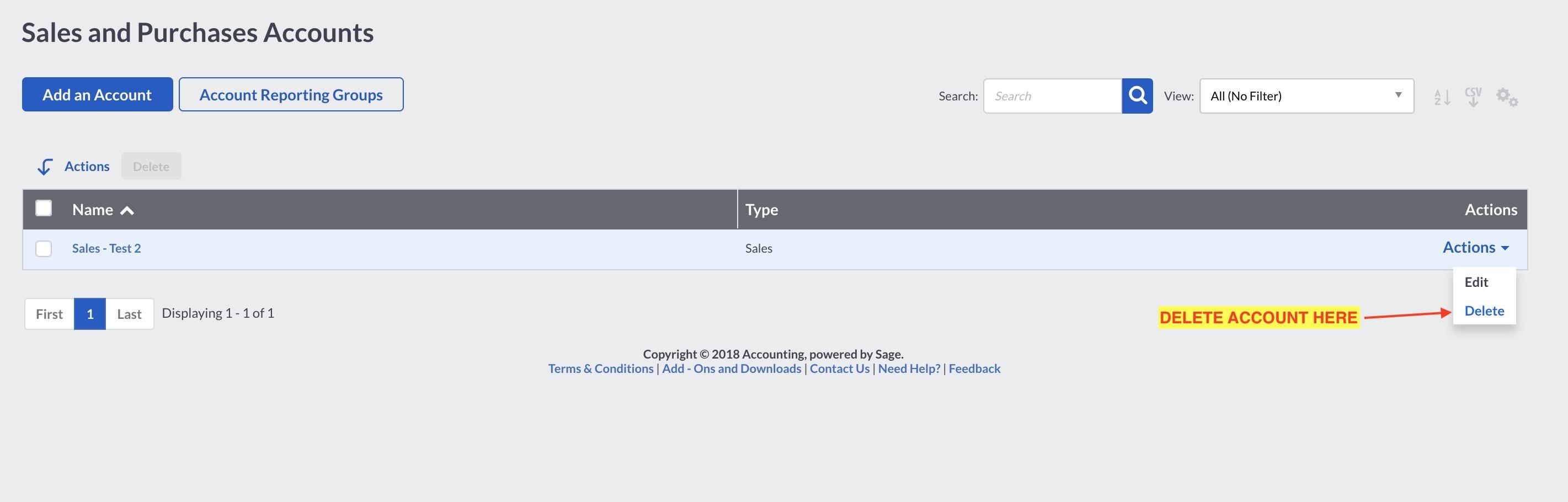
You can also delete the account on the same screen as shown in the video above. You need to make sure the account is not linked to any items first.
See the following screenshot.
 May 4, 2018 at 3:03 pm #4188
Hi Stephen
There’s more than one way you could handle this.
Here are some options.
OPTION 1
Create an item which posts to a Sales Sub account (like I had in the video above) called Recoveries – Travel Costs.When you prepare your financial statements i.e. run the TB’s / Profit and Loss Report, you will then in your reporting process offset this credit against the Customer Travel costs i.e. because it is a separate line item you can easily identify it.
I would recommend this option as you can easily see the total spent on customer travel costs as well as how much you invoiced.
You won’t be able to allocate the credit out of this account in Sage One (by debiting it and crediting the Travel Expense account) as Sage One doesn’t allow one to post any journals to a System account which this Recovery account would be.
OPTION 2
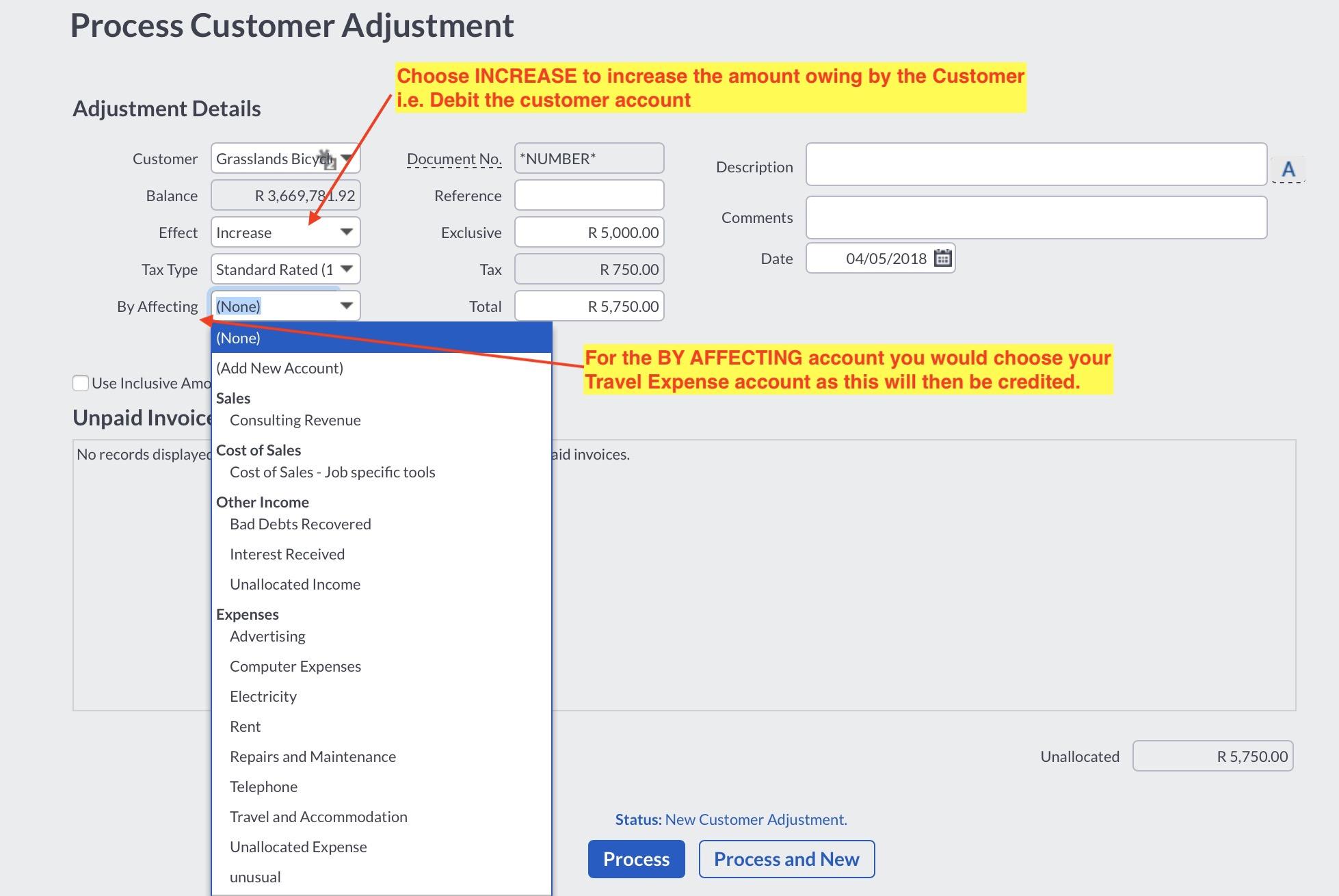
Option 2 is to use the Customer Adjustment function (under CUSTOMERS -> TRANSACTIONS) instead of a Tax Invoice.
It would be done as per the following screenshot
 May 3, 2018 at 10:39 pm #4182
Hi Stephen
1. Please see the following video and let me know if that is what you are looking for.
2. As I understand it each branch is in effect a different customer so you would setup each one as a different customer. There are no sub customer accounts. However, you could allocate all of these customers to the same Customer Category for reporting purposes.
Hope that helps.
Kind regards
Zunaid
March 12, 2018 at 11:00 pm #3881Hi Zene
We have uploaded it here:
https://students.talentstream.co.za/lessons/sage-one-mock-exam/
Good luck with the exam preparation.
Kind regards
Zunaid
December 10, 2017 at 2:22 am #3390Hi Reshma
That is excellent news – congratulations !
Thank you for letting us know and we wish you all best with your career.
Kind regards
Zunaid
November 16, 2017 at 12:01 am #3282Hi Reshma
Ok – what I would suggest is unreconcile all the items and start again.
Make sure to match each item line by line.
Please watch the following video:
Please let me know if that clears it up for you.
Kind regards
Zunaid
November 14, 2017 at 10:50 pm #3272Hi Reshma
Can you please indicate the lesson number and activity number.
Please also attach a screenshot of what you are getting.
Kind regards
Zunaid -
AuthorPosts